Advanced Settings
Configure Redis, caching, queue workers, and performance optimization settings.
Overview
Advanced settings control the technical infrastructure of FeedbackFlow, including caching strategies, queue configuration, and performance optimizations.
Technical Knowledge Required
These settings require understanding of Laravel, Redis, and server administration. Incorrect configuration can cause application failures.
Accessing Advanced Settings
- Navigate to Settings → Advanced Optimization
- Review current configuration
- Make changes carefully
- Test after each change
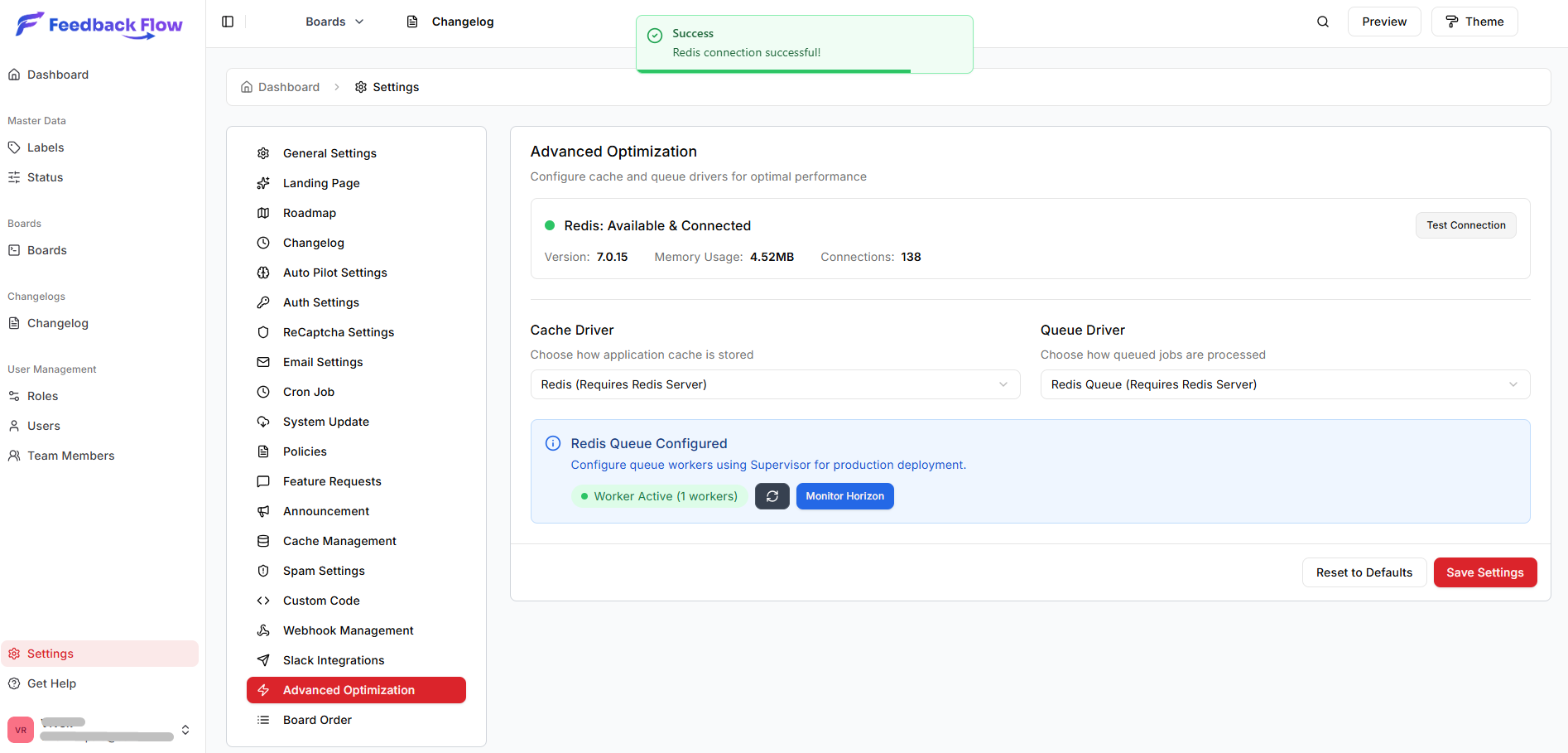
Redis Configuration
Redis dramatically improves performance for caching, sessions, and queue jobs.
Redis Connection Settings
Configure Redis connection details:
| Setting | Description | Default |
|---|---|---|
| Enable Redis | Use Redis for cache/queue | Recommended |
| Redis Host | Redis server address | 127.0.0.1 |
| Redis Port | Redis port number | 6379 |
| Redis Password | Redis auth password | Empty (no auth) |
| Redis Database | Database number (0-15) | 0 |
Test Redis Connection
Click Test Redis Connection to verify connectivity.
Successful connection:
✓ Redis connection successful
Server version: 6.2.6
Memory usage: 2.5 MB
Failed connection:
✗ Could not connect to Redis
Error: Connection refused
Redis Use Cases
Caching:
- Configuration cache
- Route cache
- View cache
- Model cache (boards, feature requests)
Sessions:
- User session storage
- CSRF token storage
Queues:
- Email jobs
- Webhook delivery
- Spam detection processing
Cache Configuration
Cache Driver
Select cache storage backend:
Options:
redis- Redis (recommended)file- File systemdatabase- Database tablememcached- Memcached server
Recommendation: Use Redis for best performance.
Model Cache Settings
FeedbackFlow caches database models for faster queries.
| Setting | Description | Default |
|---|---|---|
| Enable Model Cache | Cache Eloquent models | Enabled |
| Cache TTL | Time to live (minutes) | 30 |
| Cache Store | Which cache store to use | redis |
Cached models:
- Boards
- Feature requests
- Users
- Categories
- Statuses
- Tags
Clear Cache
Buttons to clear different cache types:
- Clear Application Cache - Application data cache
- Clear Configuration Cache - Cached config files
- Clear Route Cache - Cached routes
- Clear View Cache - Compiled Blade views
- Clear All Caches - Everything
When to Clear Cache
Clear caches after:
- Updating
.envfile - Changing configuration
- Deploying new code
- Debugging issues
Queue Configuration
Configure background job processing.
Queue Driver
Select queue backend:
Options:
redis- Redis queues (recommended)database- Database table queuessync- Synchronous (no queue, not recommended)sqs- AWS SQS
Recommendation: Use Redis for reliability and performance.
Queue Settings
| Setting | Description | Default |
|---|---|---|
| Queue Connection | Active queue driver | redis |
| Default Queue | Queue name | default |
| Max Tries | Retry attempts for failed jobs | 3 |
| Retry After | Seconds before retry | 90 |
Queue Worker Status
View queue worker status:
Running:
✓ 2 queue workers running
Last processed job: 5 seconds ago
Jobs in queue: 12
Not Running:
✗ No queue workers detected
Warning: Emails and webhooks will not be sent
Restart Queue Workers
Click Restart Queue Workers to reload workers after configuration changes.
# Manual restart via command line
sudo supervisorctl restart feedbackflow-worker:*
Performance Optimization
Database Query Optimization
| Setting | Description | Recommendation |
|---|---|---|
| Enable Query Cache | Cache database queries | Enabled |
| Eager Loading | Auto-load relationships | Enabled |
| Query Logging | Log slow queries | Disabled (production) |
Asset Optimization
| Setting | Description | Recommendation |
|---|---|---|
| Minify CSS | Compress CSS files | Enabled (production) |
| Minify JavaScript | Compress JS files | Enabled (production) |
| Enable CDN | Use CDN for assets | Optional |
Response Compression
| Setting | Description | Recommendation |
|---|---|---|
| Enable Gzip | Compress HTTP responses | Enabled |
| Compression Level | 1-9 (higher = more compression) | 6 |
Session Configuration
Session Driver
Select session storage:
Options:
redis- Redis (recommended)file- File systemdatabase- Database tablecookie- Encrypted cookies
Recommendation: Use Redis for better performance.
Session Settings
| Setting | Description | Default |
|---|---|---|
| Session Lifetime | Minutes until expiration | 120 |
| Expire on Close | End session when browser closes | false |
| Encrypt | Encrypt session data | true |
Horizon Dashboard (Queue Monitoring)
Laravel Horizon provides a dashboard for monitoring queue jobs.
Enable Horizon
- Toggle Enable Horizon Dashboard
- Save changes
- Access at
/admin/horizon
Horizon shows:
- Real-time queue metrics
- Failed jobs
- Job throughput
- Worker processes
Horizon Authentication
Horizon is restricted to admin users automatically.
Broadcasting Configuration
For real-time features (if enabled).
Broadcast Driver
Options:
pusher- Pusher serviceredis- Redis with Laravel Echolog- Log only (testing)null- Disabled
Pusher Settings
If using Pusher:
| Setting | Required |
|---|---|
| Pusher App ID | From Pusher dashboard |
| Pusher Key | Public key |
| Pusher Secret | Secret key |
| Pusher Cluster | Server cluster (e.g., us2) |
Logging Configuration
Log Level
Control log verbosity:
Options:
debug- Detailed debugging (development only)info- Informational messagesnotice- Normal but significant eventswarning- Warning messageserror- Error messages onlycritical- Critical errors only
Production: Use error or warningDevelopment: Use debug or info
Log Channel
Where logs are written:
Options:
stack- Multiple channels (recommended)single- Single log filedaily- Daily rotating log filessyslog- System logerrorlog- PHP error log
View Logs
Access logs:
- Navigate to Admin → System Logs
- Filter by level, date, or search
- View detailed error traces
Database Optimization
Connection Pooling
| Setting | Description | Default |
|---|---|---|
| Persistent Connections | Reuse DB connections | Enabled |
| Connection Timeout | Seconds before timeout | 60 |
| Max Connections | Maximum concurrent connections | 100 |
Query Timeout
Set maximum query execution time:
Default: 60 seconds Recommended: 30 seconds for production
Performance Monitoring
Application Performance
View real-time metrics:
- Average response time
- Memory usage
- Database query count
- Cache hit ratio
- Queue job throughput
Optimization Recommendations
System analyzes performance and suggests:
- Enable missing optimizations
- Increase cache TTL
- Add more queue workers
- Enable Redis if not active
Troubleshooting
Redis Connection Fails
Check Redis is running:
redis-cli ping
# Should return: PONG
Check Redis configuration:
redis-cli infoRestart Redis:
sudo systemctl restart redisQueue Workers Not Processing
Check worker status:
sudo supervisorctl status feedbackflow-workerView worker logs:
tail -f storage/logs/worker.logRestart workers:
sudo supervisorctl restart feedbackflow-worker:*Cache Not Working
Clear all caches:
php artisan cache:clear
php artisan config:clear
php artisan route:clear
php artisan view:clear
Check permissions:
chmod -R 775 storage/framework/cacheBest Practices
Production Settings
Recommended for production:
- Cache Driver: Redis
- Session Driver: Redis
- Queue Driver: Redis
- Model Cache: Enabled, 30 min TTL
- Log Level:
error - Debug Mode: Disabled (in General Settings)
Development Settings
Recommended for development:
- Cache Driver: File or Redis
- Queue Driver: Redis or database
- Log Level:
debug - Query Logging: Enabled
Regular Maintenance
Weekly:
- Check queue worker status
- Review error logs
- Monitor cache hit ratio
Monthly:
- Update Redis/dependencies
- Review performance metrics
- Optimize slow queries
Next Steps
- Createing Boards -New board create
- Board Customization - Advanced branding and customization