Board Customization
Advanced branding and customization options for boards to match your brand identity.
Accessing Board Customization
- Navigate to Boards
- Click on a board name
- Click Edit Board or Settings tab
- Scroll to customization sections
Visual Branding
Color Schemes
Customize board colors:
Primary Color
- Main brand color for the board
- Applied to: Buttons, links, accents, badges
- Format: Hex color code (e.g.,
#3B82F6)
Accent Color (if available)
- Secondary color for highlights
- Used sparingly for contrast
Text Color
- Automatically calculated for readability based on primary color
- Can be overridden manually
Header Image
Header Image
- Displayed at top of board page
- Recommended size: 1200x300 pixels
- File size limit: 5 MB
- Formats: JPG, PNG, WebP
Background Image (optional)
- Subtle background for board page
- Recommended: Low-opacity, non-distracting patterns
- Automatically dims for readability
Logo
Upload a board-specific logo:
- Displayed instead of application logo
- Recommended size: 200x50 pixels
- Transparent PNG recommended
Content Customization
Custom Headings
Override default text throughout the board:
| Section | Default | Customizable |
|---|---|---|
| Main Heading | Board name | Custom heading text |
| Subtitle | Board description | Custom subtitle |
| Intro Heading | "Welcome" | Any text |
| Intro Text | (none) | Guidelines, welcome message |
Form Labels
Fully customize the Feature Request form:
Title Field
- Label text
- Placeholder text
- Help text (appears below input)
Description Field
- Label text
- Placeholder text
- Help text
- Character limit message
Attachment Section
- Label text
- Allowed file types message
- File size limit message
Category/Priority Dropdowns
- Custom labels for each dropdown
- Placeholder text
Submit Button
- Button text
- Submitting state text
- Success message
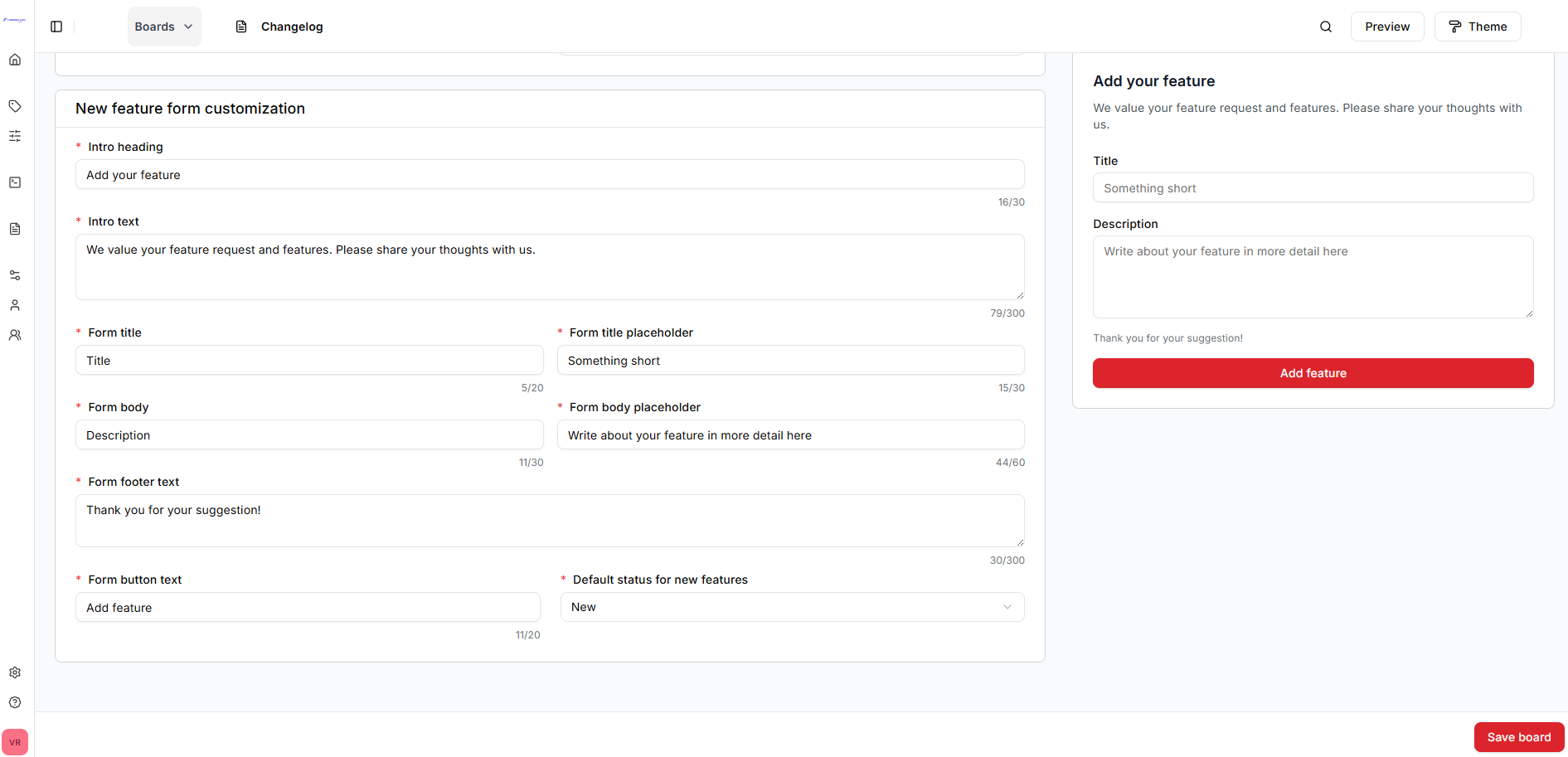
Footer Text
Add custom text below the submission form:
Common uses:
- Response time expectations: "We review all submissions within 24 hours"
- Guidelines: "Please search existing requests before submitting"
- Legal: "By submitting, you agree to our Terms of Service"
- Contact: "Need help? Contact support@example.com"
Email Customization
Board-Specific Email Templates
Customize email notifications for this board:
Available templates:
- New feature request submitted
- Feature request status changed
- Feature request completed
- Comment added
SEO Customization
Meta Information
Optimize for search engines:
| Field | Description |
|---|---|
| Meta Title | Page title for SEO (max 60 chars) |
| Meta Description | Page description (max 160 chars) |
| Keywords | Comma-separated keywords |
| OG Image | Social media preview image (1200x630px) |
Example:
Meta Title: Product Feature Requests | YourCompany
Meta Description: Vote on and submit feature requests for
                 YourProduct. Help shape our roadmap.
Keywords: feature requests, product feedback, roadmap
Brand Guidelines
Consistency Tips
Use consistent branding across boards:
- Same primary colors (or color family)
- Similar tone in copy
- Matching form label styles
- Consistent intro sections
Or differentiate boards:
- Unique colors per product
- Different imagery per category
- Custom messaging per audience
Mobile Responsiveness
All customizations automatically adapt to mobile devices:
Test mobile view:
- Preview board
- Use browser's mobile emulation
- Check color contrast
- Verify text readability
- Test form usability
Accessibility
Ensure customizations maintain accessibility:
Color Contrast
- Use WebAIM Contrast Checker
- Minimum ratio: 4.5:1 for text
Alt Text
- Add descriptive alt text for all images
- Include meaningful descriptions
Form Labels
- Keep labels clear and descriptive
- Don't rely on color alone
Preview Before Publishing
Always preview changes before saving:
- Make customizations
- Click Preview
- Opens board in new tab
- Review all changes
- Go back and adjust if needed
- Click Save when satisfied
Best Practices
Keep it simple
- Don't over-customize
- Maintain readability
- Prioritize usability over aesthetics
Test thoroughly
- Preview on multiple devices
- Check different browsers
- Test form submission
- Verify colors work in light/dark mode
Stay on-brand
- Match your company's brand guidelines
- Use approved colors and fonts
- Maintain consistent voice
Next Steps
- Board Settings - Configure board behavior
- Submitting Requests - How users submit requests